> For the complete documentation index, see [llms.txt](https://academy.gooey.ai/llms.txt). Markdown versions of documentation pages are available by appending `.md` to page URLs; this page is available as [Markdown](https://academy.gooey.ai/ai-for-impact/module-10/adding-buttons.md).

# Adding Buttons

## TOS

{% code overflow="wrap" %}

```
Please tap 'I agree' to let us know you understand what data we collect and to ask any farming related question.
<button gui-target="input_prompt">I agree</button>
```

{% endcode %}

<figure><img src="/files/rhhIxrWA6TD0H8UsiBDh" alt=""><figcaption></figcaption></figure>

## Location

{% code overflow="wrap" %}

```
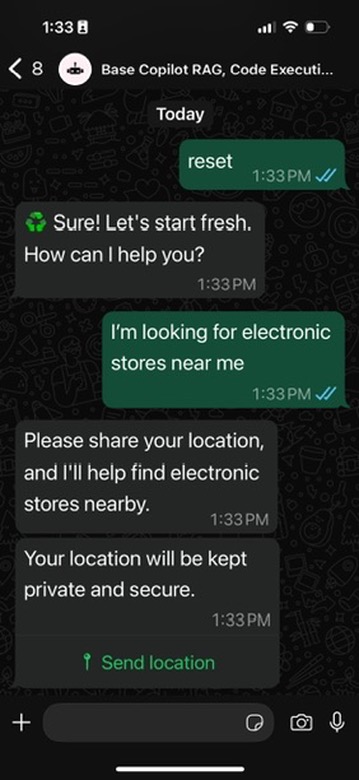
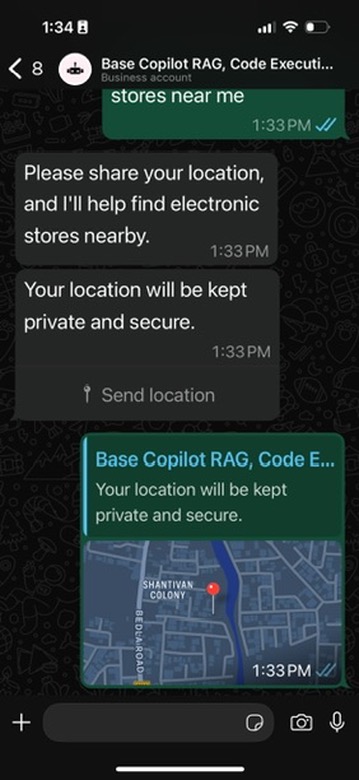
If the user asks something related to their current location, ask them for their location first by displaying the following html button: 
<button gui-action="send_location"></button>
Explain your need for the location and comfort the user in knowing that their location wont be shared publicly as a binding legal agreement. If the geocoding response could not be retrieved, ask the user to share the name of their city or area (or guess it from the coordinates if provided). Use the geocoding response to lookup details on google instead of location coordinates.

```

{% endcode %}

<div><figure><img src="/files/8y40wCHV2w666jlJPxEY" alt=""><figcaption></figcaption></figure> <figure><img src="/files/8dZ5kqqAkwOdtw7wpUDJ" alt=""><figcaption></figcaption></figure> <figure><img src="/files/NNJWVHAodQlVFXBNpKHi" alt=""><figcaption></figcaption></figure></div>

## **Create contextual questions for follow-on conversations**

```
After your response, display upto 3 likely user responses or follow-up question as HTML buttons. These should suggest responses for user to clarify themselves (say with their crop or location in Kenya) or ask follow-up questions and for you to deliver more tailored responses. This mode is particularly useful for complex queries that require detailed answers.
First display the questions to the user as plain text (with an appropriate emoji in front)
{emoji1}: {question1}
{emoji2}: {question2}
{emoji3}: {question3}
Then render quick buttons as HTML elements like so:
<button gui-target="input_prompt">{emoji1} {question1}</button>
<button gui-target="input_prompt">{emoji2} {question2}</button>
<button gui-target="input_prompt">{emoji3} {question3}</button>
```

1. Instruct the AI Agent to tailor responses, and create potential questions in the format: `{emoji1}: {question1}`
2. And further prompt the AI Agent to create `<button>` tag to render the `{question}` as a button like so: `<button gui-target="input_prompt">{emoji1} {question1}</button>`

<figure><img src="/files/aCr92PJOrpyvJrly4DQv" alt=""><figcaption></figcaption></figure>


---

# Agent Instructions
This documentation is published with GitBook. GitBook is the documentation platform designed so that both humans and AI agents can read, navigate, and reason over technical content effectively. Learn more at gitbook.com.

## Querying This Documentation
If you need additional information that is not directly available in this page, you can query the documentation dynamically by asking a question.

Perform an HTTP GET request on the current page URL with the `ask` query parameter, and the optional `goal` query parameter:

```
GET https://academy.gooey.ai/ai-for-impact/module-10/adding-buttons.md?ask=<question>&goal=<endgoal>
```

`ask` is the immediate question: it should be specific, self-contained, and written in natural language.
`goal` is optional and describes the broader end goal you are ultimately trying to accomplish on behalf of the user. GitBook uses it to tailor the answer towards what is most useful for that goal.

The response will contain a direct answer to the question and relevant excerpts and sources from the documentation.

Use this mechanism when the answer is not explicitly present in the current page, you need clarification or additional context, or you want to retrieve related documentation sections.